73Link public betaAndroid and Windows beta builds are available from the Downloads page. Web Client and Web Mini are available without installation.View clients
ConnectCommunicateBe Heard
Low-latency Push-To-Talk, live channels, station presence, chat, profiles, and radio gateway control—built for amateur radio communication.
Web Client is designed for computers, laptops, iPads, and tablets · Web Mini is designed for mobile phones
73Link today
One network, multiple ways to connect
Choose the client that fits your station and operating setup.
Web ClientFull browser dashboard for computers, laptops, iPads, and tablets.
Web MiniMobile-first browser controls designed for phone screens.
Desktop ClientA public Windows beta build, still being prepared for a signed production release.
iOS ClientNative iPhone and iPad client currently under development.
Radio GatewayExternal PTT plus Manual, VOX, CAT, and Serial COS receive detection.
Inside 73Link
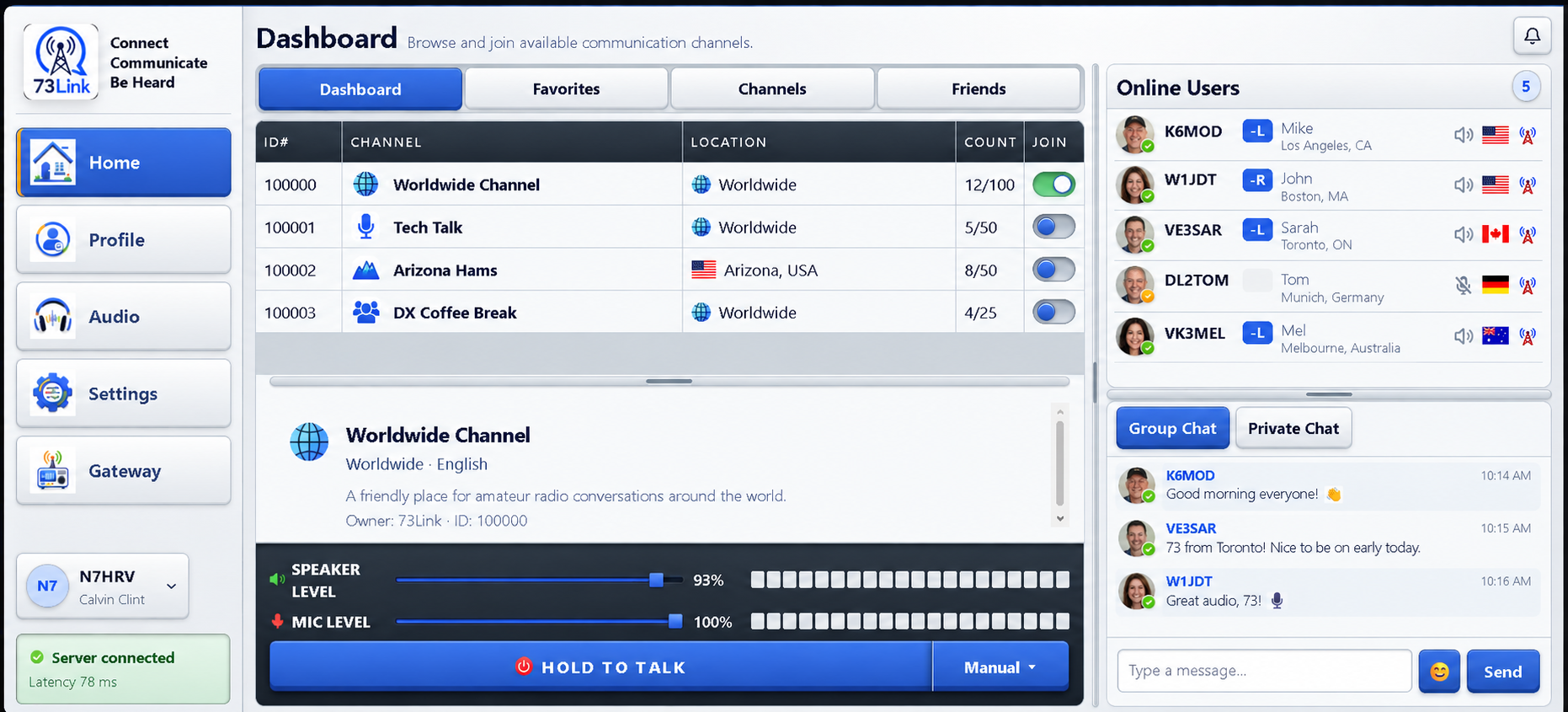
A complete operating dashboard
Channels, connected operators, live status, chat, audio levels, and Push-To-Talk controls stay visible in one focused workspace.
About 73Link
Amateur radio communication, extended through the internet
73Link complements radio operation with low-latency network audio, recognizable station identities, shared channels, text chat, and clear Push-To-Talk control.
Operators can connect from the responsive web app or the developing Windows client. Link and repeater stations can bridge supported radios through configurable gateway controls, including Manual, VOX, CAT, and Serial COS detection.
Built for operatorsFamiliar callsigns, channel activity, radio controls, and transmission status remain central to the experience.
One connected networkRegional infrastructure supports station presence, low-latency audio, profiles, friends, chat, and channel management.
Actively evolvingThe web app is available to try now while the Windows desktop client continues toward its September 30, 2026 release.
Choose your client
Try 73Link now
Choose either browser experience, or install the public Android or Windows beta.
For larger screens
73Link Web Client
The complete browser dashboard for computers, laptops, iPads, and tablets. Join channels, use live audio and PTT, manage your profile, chat, and configure supported radio gateway controls.
Open Web ClientA microphone and browser permission are required for audio and PTT.
For mobile phones
73Link Web Mini
A compact, touch-friendly version of 73Link designed specifically for phone screens, with channels, friends, chat, settings, live audio, and PTT.
Open Web MiniNo installation required. Allow microphone access for audio and PTT.
Installable clients
Android, Windows & iOS
Android and Windows public beta clients are available for testing. The native iOS client for iPhone and iPad is under development.